What Is the 365 Market Charge on Your Bank Statement?
Have you ever scanned your bank statement and stumbled upon a cryptic charge labeled “365 Market”? You’re not alone! This mysterious entry has puzzled many a bank account owner. But fear not, financial detectives! We’re here to crack the case of the 365 Market charge.
What is 365 Market?
365 Market isn’t a physical storefront—it’s a technology provider offering self-checkout systems for unattended retail environments like micro-markets, vending machines, and smart kiosks. If you’ve ever used an office snack kiosk or a modern laundromat checkout, you’ve likely interacted with 365 Market’s system.
These types of merchant codes often confuse consumers the same way entries like the PNP BILLPAYMENT charge or the PAI ISO charge do, because the processor name—not the location—is what appears on your statement.
Why is 365 Market charge on my bank statement?
That 365 Market charge indicates that a purchase was made through their kiosk technology. It could be a snack, drink, laundry product, or any other item sold through an unmanned micro-market. These entries behave similarly to other automated retail charges, such as CSC ServiceWorks transactions, where the backend operator—not the building—appears on your statement.

How does 365 Market charge appear on my statement?
The 365 Market charge can appear in several forms depending on the checkout system and bank. Common descriptors include “365 Market,” “365 Retail Markets,” “USA*Canteen Vending,” or location-tagged entries like “365 SOS Troy MI.”
These variations resemble other merchant-coded entries, such as 365 Retail-type charges or even codes like FDMS that confuse consumers due to generic naming.
What if I don’t recognize the charge?
Before assuming fraud, double-check recent purchases—micro-market snacks, office vending machine runs, or laundromat kiosks are easy to forget. Search your email for receipts, as many kiosks send automated confirmations.
If you’re still unsure, ask your bank for the merchant details. Banks can provide more data, just as they do for other unclear charges like SP AFF fees or TPG Products transactions.
If the charge is truly unauthorized
If a charge is genuinely unfamiliar, contact your bank immediately to dispute it and have the card frozen if needed. You should also report suspicious activity to the Federal Trade Commission (FTC), the same agency that handles most fraud and identity-theft complaints. Acting quickly ensures you block further unauthorized activity and recover funds promptly.
Preventing future 365 Market charges
- Be mindful of your purchases: Only use self-checkout technology at locations you trust and keep track of your spending.
- Review your bank statements regularly: Look for any unfamiliar charges and address them promptly.
- Set up transaction alerts: Many banks offer alerts that notify you when a charge is made to your account. This can help you catch unauthorized transactions quickly.
Delving Deeper: Unauthorized 365 Market Charges
While most 365 Market charges are legitimate purchases, there are instances where you might encounter unauthorized charges on your statement. Let’s explore some potential scenarios and how to tackle them:
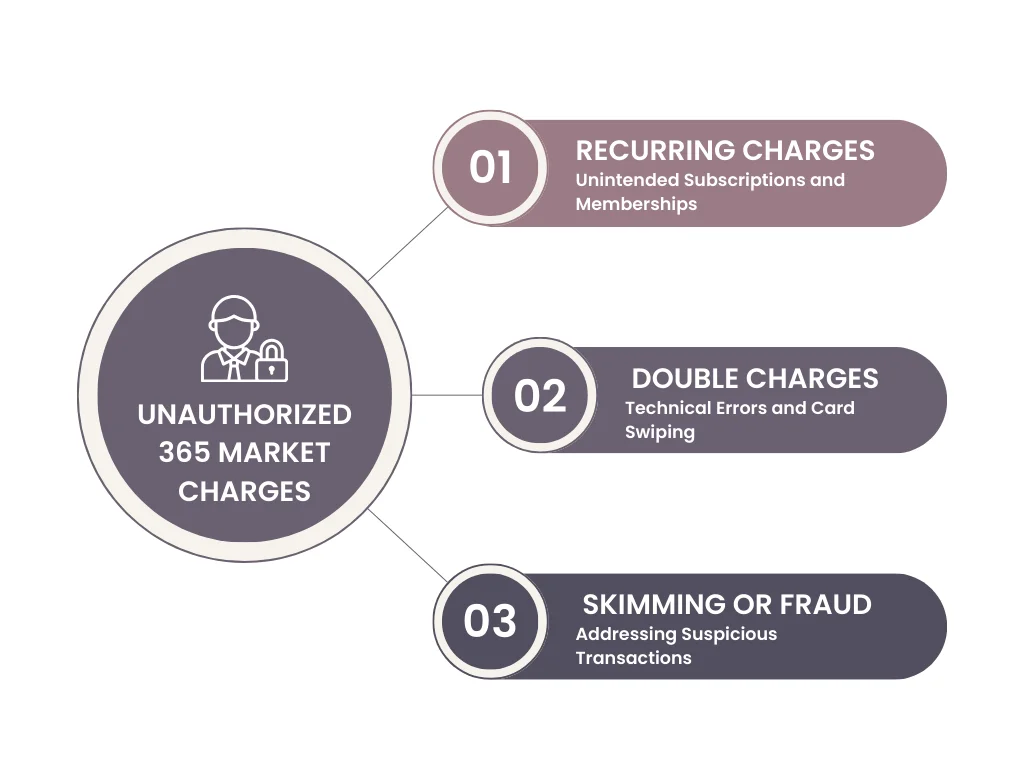
1. Recurring Charges
- Subscription Services: Did you unknowingly sign up for a subscription service like coffee refills or laundry detergent delivery through a 365 Market kiosk? Check your email and account settings for any recurring charges related to the location you used their technology.
- Micro-Market Memberships: Some office micro-markets operated by 365 Market may offer membership programs. If you used your card to set up a membership but later decided to cancel, there might be lingering charges.
2. Double Charges
- Technical Glitch: Although rare, technical glitches can sometimes lead to duplicate charges. Check your statement for multiple entries with the same transaction amount and date from the same 365 Market location.
- Accidental Double Swipe: Did you accidentally swipe your card twice at the self-checkout kiosk? Contact the location directly or reach out to 365 Market customer service to inquire about the possibility of a double charge.
3. Skimming or Fraud
- Suspicious Charges: If you see charges originating from unfamiliar 365 Market locations or transactions you’re absolutely certain you never made, it’s crucial to take immediate action. Contact your bank immediately to report the suspected fraud and dispute the unauthorized charges.
- Compromised Card Information: If you suspect your card information may have been compromised, contact your bank to request a new card and update your online banking credentials.
Tips for Handling Unauthorized Charges
If you suspect fraud, gather receipts, note unusual timestamps, and report the issue immediately. Keeping consistent watch over your banking activity, especially for cryptic merchant codes like Google Miniclip charges—helps you act fast. Consider setting up instant transaction alerts and replacing your card if multiple unknown charges appear.
By staying informed and taking appropriate action, you can protect yourself from unauthorized 365 Market charges and maintain control of your finances. Remember, knowledge is power in the realm of personal finance.
Conclusion
The “365 Market Charge” may have once shrouded your bank statement in mystery, but now you hold the key. With a deeper understanding of its origin, purpose, and potential pitfalls, you can navigate your finances with newfound clarity and confidence. Remember, knowledge is your shield against confusion and unauthorized charges. Whether it’s a forgotten vending machine snack or a suspicious 365 Market transaction, you’re now equipped to decipher the details and take appropriate action.
So, the next time you encounter that cryptic entry on your statement, don’t let it spark panic. Take a deep breath, apply the knowledge you’ve gained, and confidently unravel the mystery. After all, financial literacy is a superpower, and you’ve just leveled up.
Read out more articles related to unknown bank charges.
FAQ
What is 365 market charge on my card?
The “365 Market Charge” on your card is a transaction associated with 365 Retail Markets. To understand it, review your purchase history, verify its legitimacy, and contact the merchant for clarification if needed.
What is 365 troy market?
“365 Troy Market” appears to be a specific transaction or charge on your statement. Investigate your recent purchases, verify its legitimacy, and contact the merchant if further clarification is required.
Why is 365 market troy mi on my bank statement?
The “365 Market Troy, MI” on your bank statement likely corresponds to a transaction with a business located in Troy, Michigan. Review your recent purchases and contact the merchant for specific details on the charge.